

Is Lyro a good fit for your support team?
Tidio's Lyro is an AI assistant for customer questions. It can use your help content to answer shoppers, while your team handles requests that need a person. It's worth considering if you want AI and human support to work together and can keep your store information current.
The main catch for beginners: Tidio, Lyro and Flows aren't the same subscription or allowance. Be clear about which parts you need, especially if you're expecting recurring free AI usage.
This review uses official documentation checked on September 6, 2026. We haven't tested Lyro on a live store. The examples below explain what to look for rather than reporting measured accuracy or sales results.
Lyro, live chat and Flows: what's the difference?
Think about a shopper who asks, “Can I return this if the size is wrong?” Lyro could answer from your returns information. A predefined Flow could collect details through a set sequence. A support teammate could decide an unusual exception.
Tidio sells Lyro AI Agent, Customer Service and Flows separately or in bundles. Check the included products rather than assuming every Tidio plan gives you the same AI access. Official pricing and product FAQ
The useful question is what you want to happen next. Answering a policy question, collecting information and changing an order are different jobs. You may need only one to start.
What can Lyro use to answer questions?
See what you need to prepare: The official dialog separates website URLs, manual answers and file uploads. Before starting your trial, decide whether you can use an existing shipping page or need to write a specific Q&A for exceptions. After importing it, inspect the stored answer rather than assuming the upload is enough.
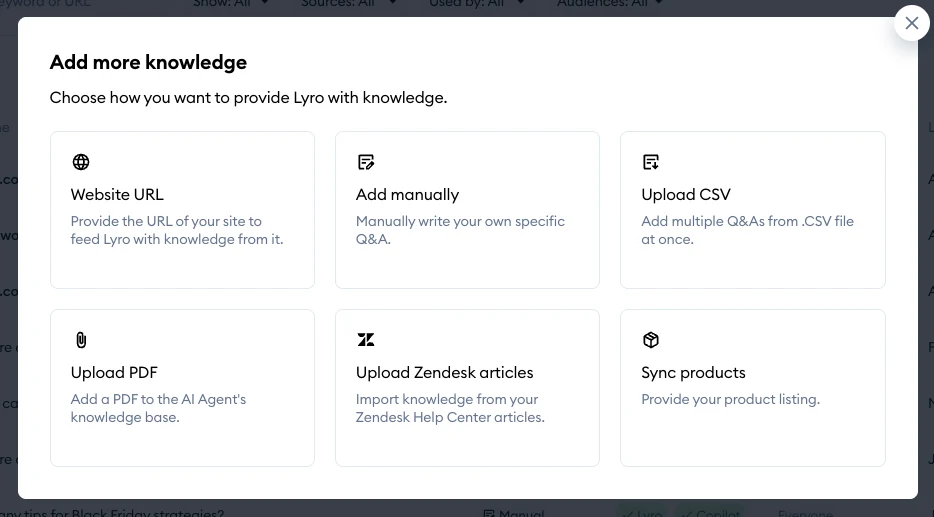
Lyro supports website content, manually added questions and answers, and file imports. That gives you several ways to supply the facts customers ask about. Knowledge documentation
Start with delivery, returns and your main products. If a policy has an exception—for example, a different return rule for customized items—include that detail. Remove older information that contradicts it.
Lyro also documents Shopify product recommendations, with separate integration and subscription requirements. Shopify recommendations
For an example check, ask for a product in a particular size or material. Look for an answer that respects the requirement, not just a plausible suggestion. This is especially useful when your catalog contains similar variants.
Start with a 7-day free trial
Tidio offers a 7-day free trial with no credit card required. Unless you choose a paid subscription, your account moves to the Free plan when the trial ends. Use that time to try common customer questions and check how a conversation reaches your team. Official trial details (checked September 7, 2026).
The seven-day trial period and Lyro's 50 free conversations are separate limits. A trial doesn't mean unlimited AI conversations or a free allowance that renews every month. Check the available usage in your account.
Pricing: the free allowance and paid conversations
Lyro's documentation describes 50 free AI conversations as a one-time, non-renewing allowance. Recurring paid allowances are separate. A new thread counts when Lyro first responds; a message after 15 minutes of inactivity starts another thread. Lyro quota rules
For example, several quick exchanges may use one AI conversation, while a customer returning later may start another. This is a billing example, not a claim about how often customers return.
Check the current offer for your billing period, included products, renewal date and what happens when the quota runs out. Budget separately for your team's support tools, Lyro conversations and Flows usage. A conversation allowance doesn't tell you how many issues will be resolved.
Our Zipchat vs. Tidio comparison also explains why conversation-based and reply-based allowances aren't directly interchangeable.
TidioBring AI answers and live chat together7-dayfree trialNo credit card requiredMoves to the Free plan afterward unless you choose a paid subscriptionTry Tidio free for 7 days
What happens when a customer needs a person?
Lyro has configurable handoff behavior: rules for passing a conversation to your team. Try a request such as “I'd like to speak to someone” and check where it goes, what context the teammate receives and what the customer sees outside staffed hours. Lyro configuration
Have a teammate continue the example conversation. Can they help without asking the customer to repeat everything? That's a more useful check than simply seeing an “I'll get help” message.
Custom actions are a more advanced step
Lyro Actions can retrieve or send data through external APIs—the connections software uses to exchange information. Tidio describes this as work for advanced users or developers and says it doesn't validate or roll back integrations. Actions documentation
If you need a custom action such as changing an address, check who will build it, verify the customer and handle a failed or incorrect change. Don't treat a good answer about an order as proof that the app can safely edit it in your setup.
Selling in more than one language?
Lyro supports multiple languages, including Japanese, and lets you restrict which languages a project uses. These controls are separate from translations of the chat widget's interface. Multilanguage documentation
Try the same question in the languages your customers use. Check the applicable shipping or return policy as well as the wording, and decide who can help when the conversation needs a person.
Reasons to consider it—and reasons to wait
Consider Lyro if you have recurring questions, reliable help content and a team that wants to combine AI replies with human support. The different content sources and documented Shopify recommendations give you concrete features to explore.
Start more cautiously if your main requirement is a custom action across several systems, or nobody has time to keep the help content current. Those needs add work beyond switching on an AI assistant.
Frequently asked questions
Do Lyro’s free conversations renew every month?
The free AI conversations are a one-time, non-renewing allowance, separate from the trial period. Recurring paid allowances are different, so confirm your available usage and budget for ongoing AI support separately.
Do I need a developer for custom Lyro actions?
Tidio describes Lyro Actions as work for advanced users or developers. They connect to external APIs, so agree who will build the action, verify the customer and handle failed or incorrect changes.
What information can I give Lyro to answer customers?
Lyro supports website content, manually added questions and answers, and file imports. Start with delivery, returns and main products, include relevant exceptions, and remove old information that contradicts current store policies.
A simple first trial
- Choose a small group of common questions and write the expected answers.
- Confirm the content sources, Shopify connection and allowance you need.
- Try a straightforward question, one missing an important detail, and a policy exception.
- Ask for a person and check the full handoff.
- Record wrong answers, repeat contacts and time spent making corrections.
- Review the results before your next billing decision.
If you'd like to compare more options first, see our four-tool support comparison. The Shopify AI support guide helps you turn a small trial into a practical support routine.


