

Build one complete buying journey first
For a first Shopify store, use the trial to prepare one real product and delivery settings, then check plan requirements before testing payments. A complete journey means a shopper can understand the item, check delivery costs, pay and receive the right follow-up. A polished home page alone does not prove that the store is ready.
This guide is for a small physical-product business creating a new online store. A migration, a large catalog import or a retail POS rollout needs its own plan. We checked official sources on September 19, 2026; this is an editorial setup guide, not a claim that we opened or operated a merchant account.
Shopify supplies the storefront and the product and order administration. Decide which product to test before expanding into extra applications. AI writing and customer chat can come later: see our separate guides to Shopify Magic product descriptions and Shopify Inbox.
Prepare a product and a fulfillment promise
Collect the facts you will need to keep consistent throughout the store. For a fictional canvas-pouch business, that means the material, dimensions, photos, available stock, selling price, packed weight and dispatch time. The example is a planning exercise, not sales data.
Choose an initial delivery area that you can serve reliably. Write down who will check new orders and answer a delayed-delivery message. If you work alone, setting a daily routine is still useful; the storefront does not pack parcels or settle ambiguous return requests for you.
The official general checklist covers business details, currency, shipping, payments and store policies. Treat those as decisions, rather than boxes to fill with sample text. Your product and location determine what additional requirements you need to check before trading.
For a US-focused store, organize prices and delivery assumptions for that market. Do not copy a launch budget in Japanese yen or assume that a different country's card fees apply. If you plan international sales, investigate those markets before making a worldwide shipping promise.
Add a representative product and choose a usable theme
Start with the product that best exposes your normal buying choices. Shopify's product instructions describe adding and previewing items through Products in the admin. Keep the product unavailable to customers until its information and sales-channel settings are ready.
Our suggested review is concrete: select every offered color or size, compare its image and price, and check whether stock availability makes sense. A good description cannot correct a wrongly configured variant. Remove sample products or clearly unfinished content from the storefront you intend to launch.
A theme is the storefront's design template. Evaluate it with your own photographs and realistic text before paying for a design you have only seen in a demo. Look for readable pricing, useful product options and an obvious add-to-cart action. A tiny catalog should not need elaborate navigation to feel complete.
Use a phone as well as a desktop browser. Check that shoppers can read dimensions, change a selection and return from the cart without losing their way. We recommend solving these basic tasks before installing extra conversion widgets.
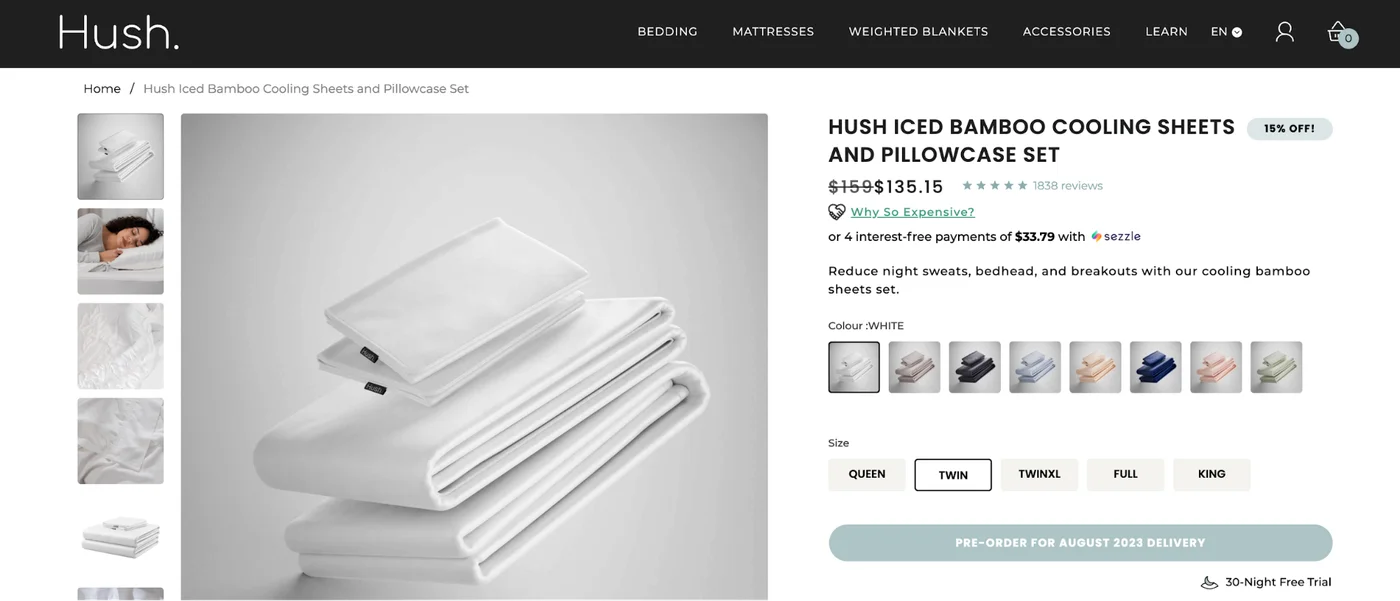
Read the page as a shopper: can you move from product photos to the right color and size, then find the purchase button? You do not need to copy this layout. Check the choices your first product requires and repeat the journey on a phone.
Watch the setup video featured in Shopify’s official tutorial on YouTube. We checked its link in the official Shopify tutorial on September 19, 2026. Use it to follow product setup and theme selection; confirm subscription and launch requirements in the current help pages linked above.
Match checkout settings to what your pages promise
The amount and delivery terms at checkout should agree with the product page. If a page promises free shipping while checkout adds a delivery charge, resolve the discrepancy before inviting customers.
For the pouch example, test an order containing one item and another containing two. Use an address you intend to serve and one outside that area. These are suggested scenarios for checking your own configuration, not a recommendation of a particular carrier or shipping rate.
Configure an eligible payment provider and check whether the account setup is complete. Displaying a payment option is not the same as finishing every account requirement. Keep unresolved payment or fulfillment dependencies on your pre-launch list.
Write delivery, returns and contact information around what your team can actually do. Read the promise on the product page next to the relevant policy and order email. Send a message to the customer contact address yourself so that a broken mailbox does not become your first support issue.
Know what the trial does and what continued operation costs
Use the trial to evaluate the workflow, then make a separate subscription decision. The official free-trial page advertises three days with no credit card required for a standard new-store signup, checked September 19, 2026. Other signup routes can have different terms. Confirm the offer and end date shown for your application. A discounted introductory period after the free trial is still paid.
The trial help page says an unconverted trial pauses automatically. Once you choose a paid plan, cancel through store deactivation if you do not want continued billing. App charges can be separate. Check your account's plan status before leaving a trial unattended; signing up and accepting a subscription are different decisions (checked the same day).
Choose your country and billing frequency on the official pricing page. An annual plan's monthly equivalent is not a promise of monthly billing. Our check on September 19 encountered regional currency behavior that did not reliably confirm US prices; we have not relabeled a Japanese price as a US offer. Check the currency and total commitment shown before subscribing.
Budget separately for optional apps, themes, a domain, payment processing and shipping. Our US plan comparison explains the decision structure and labels its own verification date. Your actual checkout terms should determine the contract you accept.
A useful starting rule is to add paid tools only when you can name the missing job. That might be a particular workflow or display need, not simply an app appearing in a tutorial. Keep a list of any trials you activate and what happens at their end.
Try a new Shopify store free for 3 days
Test orders before opening the storefront
A launch check should include both the shopper experience and what the operator receives. Shopify's payment testing instructions support success and failure scenarios. Shopify Payments testing requires selecting a paid plan, and some countries require business information first. If you choose a plan during the free trial, subscription billing starts when the trial ends. Check any connected fulfillment application before testing so that a simulated order does not trigger an unintended shipment.
For your own checklist, record the selected item, quantity, delivery charge and final order state. Confirm that the admin and notifications reflect what happened. Try the customer journey on the devices you expect people to use. If something fails, record the input and the unexpected result rather than simply marking checkout as broken.
The official launch guide requires a plan, a business address and a configured payment method with test mode turned off before launch. Trial stores start in private mode. Move to the launch action only after the operating details and storefront are ready.
Do a last check of the public-facing delivery and contact pages, then confirm that real payments can be accepted. Opening the storefront is a deliberate change in who can access it; a successful preview is only one part of that decision.
Questions to settle during the trial
Your next step is a one-product setup and test-order exercise. Use what you learn to decide whether the service fits your workflow.
Do I need AI or a chat app for launch? This checklist does not require either. Shopify's June 17 mobile-editor update describes Sidekick in editing, and we checked the Inbox listing for the separate chat option. Neither removes your responsibility to confirm product facts and delivery promises.
Must everything be finished within three days? Completion time depends on your catalog and account readiness. Evaluate any continued subscription against your actual progress; we cannot promise a merchant approval time or a finished store within a particular number of hours.
What if my store serves Japan? Shopify's Japanese pricing page lists JPY pricing and Japanese support. We have not independently tested every admin feature in Japanese or measured AI writing accuracy. Review product terminology and delivery promises in your own trial. Shopify is the commerce platform here, so an individual app's rating is not a rating of Shopify itself. We did not verify a current G2 score or review count in this check.
Will launch bring sales immediately? Launch makes the store accessible. Traffic, search discovery and sales require separate work and are not guaranteed. First establish that you can take and fulfill the kind of order you want to receive.


