

“How much is shipping?” “Can I machine-wash this?” If you answer the same questions between packing orders and managing stock, start your Zipchat setup by collecting five of them.
Prepare three things: approved answers, their source pages, and a clear route to a person. A small FAQ worksheet helps you check both the AI's responses and your team's handoff process before customers use the chat.
This setup guide uses official documentation checked on September 8, 2026. The bag store, FAQs, business hours, and test questions are fictional planning examples, not results from a live merchant installation.
Start with five questions you already receive
Before trying to automate every conversation, list the questions your team answers regularly. Keep the question itself and leave customer names and contact information out of your preparation notes.
For a store selling bags and pouches, a first set might be:
- Where can I check shipping costs?
- Can I machine-wash this bag?
- Can I ask to exchange a regular-priced item for another size?
- Do the same exchange conditions apply to sale items?
- How can I speak to a person?
If your own answer isn't clear, fix the store's information first. When the outcome requires a team member's judgment, plan a handoff instead of inventing a fixed answer.
If you're still deciding what to automate, our Zipchat overview explains the use cases and conditions to consider.
Connect Shopify and check the source information
The current Shopify guide describes installing the app and enabling it through your theme's App Embeds. Zipchat reads product and policy pages, and can use additional URLs, PDFs, and text as answer sources. Current Shopify setup overview
Before installing, check the store, requested permissions, and billing terms. While preparing answers, keep track of which theme you're editing and whether its chat is visible. Our Zipchat pricing guide covers costs.
The Knowledge Base is where the AI gets reference information. Check that product details, shipping information, and exchange guidance are available. Consistency matters more than simply adding more documents.
An old PDF with previous shipping costs and a page with new costs create two places to check. Decide which information should remain, then update or remove outdated sources as appropriate. Check the actual account for completed imports and reflected updates.
Put the answer and its exceptions in one worksheet
The worksheet below demonstrates what to prepare. It is not a real store policy or a statement of legal return rights. Replace the products, conditions, and sources with your own approved information. The .example URLs are fictional.
On a phone, scroll the worksheet sideways to see all six columns.
| Question | Applies to | Approved answer outline | Exception or check | Example source URL | Checked |
|---|---|---|---|---|---|
| What does shipping cost? | Each delivery region | Ask for the region and point to its shipping table | Large items have a separate table; don't quote before checking the region | https://shop.example/shipping | 2026-09-08 |
| Can I machine-wash it? | Canvas bag A | No machine washing; spot-clean as instructed | Don't reuse the care instructions for pouch B | https://shop.example/bag-a-care | 2026-09-08 |
| Can I exchange the size? | Regular-priced items | Show the exchange guidance; staff check eligibility and stock | Explaining the process doesn't approve an exchange | https://shop.example/exchanges | 2026-09-08 |
| Can I exchange a sale item? | Sale items | Show sale-item guidance and pass the request to staff | Don't automatically apply the regular-item conditions | https://shop.example/sale-help | 2026-09-08 |
| Can I speak to a person? | Any inquiry | Route to the designated team and explain what happens next | Don't promise an immediate reply outside business hours | https://shop.example/contact | 2026-09-08 |
Copy this template for the next question. It's an internal planning note, not a Zipchat import format.
Question:
Products or regions covered:
Approved answer:
Exceptions or details to check first:
Source page URL:
Last checked:
Person responsible for updates:
“The product information is missing” and “the answer assumed the wrong product” are different problems. That distinction helps you decide what to change.
Fix source information and behavior separately
Zipchat describes a Knowledge Base for reference information, Prompt & Tools for instructions, and Add Correction for revising answers. Official knowledge and correction overview
Suppose a question about bag A receives the care instructions for machine-washable pouch B. Instead of stopping at “the AI was wrong,” consider what may have caused the response.
| What you notice | What to review | Ask again afterward |
|---|---|---|
| Bag A's care information is missing | Add the approved product-specific instructions | “How do I care for bag A?” |
| The answer didn't identify the product | Tell the AI to ask for the product name or model when unclear | “Can I wash this?” |
| An old PDF contradicts the page | Reconcile the original sources and check the update | Ask a question based on the old guidance |
| A correction was applied to another product | Make its product scope and exceptions explicit | “Can I machine-wash pouch B?” |
A sample instruction is: “If the product isn't clear, ask for its name or model before giving care instructions.” Don't instruct the AI to produce a confident answer when the needed information is missing.
After a correction, test the original question, a different phrasing, and a similar product. One correct response doesn't establish that every future answer will be correct.
Define three reasons to bring in a person
For a first setup, consider damaged items, exchange requests outside the normal conditions, and an explicit request for a person.
Zipchat documents both live takeover and tickets in a connected support system. Its guide places escalation instructions under AI Training → Prompt & Tools → Additional Instructions. Official human handoff overview
A notification arriving is different from a person joining a live chat. Check which methods your plan and integrations support, and decide where the team will reply after receiving the request.
Here's a short instruction draft. Adapt it to your actual support process before using it:
Route damaged-item reports, exchange requests that need judgment, and explicit requests for a person to the configured support team. Do not approve refunds or exchanges, or promise an unconfirmed response time. If the handoff has not succeeded, do not say it is complete; explain the store's contact method instead.
Saving these words doesn't configure the destination or grant your team access. Check the connected system, notifications, and the people who can read the conversation.
Plan separate messages for open and closed hours
Our example store has staff available Monday–Friday, 10 a.m.–5 p.m., in the store's specified time zone, excluding closure days. Replace that schedule with your actual days, hours, and named time zone.
- AI receives the inquiryCheck whether it meets a handoff condition.
- Send it to the configured destinationConfirm the notification, ticket, or conversation handoff.
- A team member reads itReview during staffed hours, or when the next business day begins.
- A team member repliesRead the context and ask for any necessary details.
Once receipt is confirmed, sample wording could be:
- During staffed hours: “Your request has reached our support team. A team member will review it and get back to you.”
- Outside staffed hours: “We've received your request. A team member will review it on the next business day. Our staffed hours are Monday–Friday, 10 a.m.–5 p.m., in our stated time zone, excluding closure days.”
If you promise “right now” or “within two hours,” your team needs to be able to deliver that. An AI that accepts questions around the clock doesn't mean a person is available 24/7.
For live support, Zipchat describes keeping the conversation tab open and using browser notifications. Check notification permissions, staff logins, and who covers an absence. Live support guidance
Try 10 questions, then test receipt through reply
What to inspect on screen: This is the test chat shown in Zipchat’s official demo. Use the message field for your prepared questions and Clear chat to start a separate conversation. A welcome message is not evidence of answer quality: check whether the replies match your shipping and returns policies.
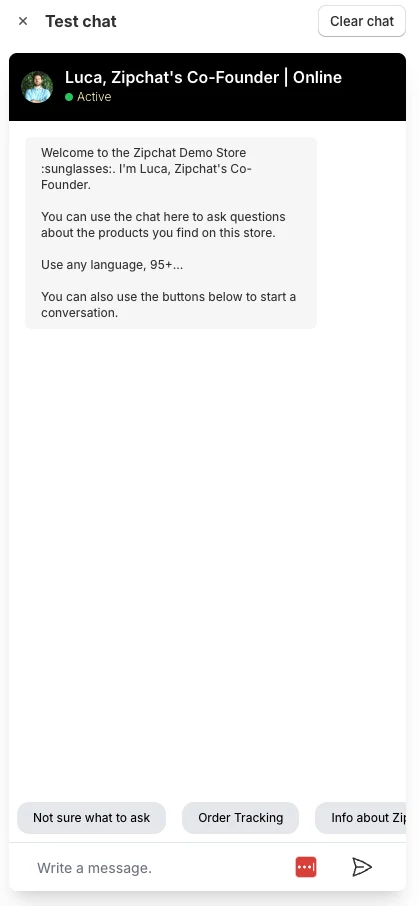
Zipchat provides Test Chat for checking responses before launch. Official testing overview The following questions are an editorial test plan for our fictional store, not product test results.
| Sample question | What to check |
|---|---|
| 1. What does shipping cost? | Ask for the region and use the right table |
| 2. Is shipping the same for large items? | Keep the large-item exception |
| 3. Can you guarantee delivery tomorrow? | Don't promise an unsupported delivery date |
| 4. Can I machine-wash bag A? | Use bag A's care information |
| 5. Can I wash this? | Ask which product the shopper means |
| 6. Does pouch B need the same care? | Don't copy bag A's instructions |
| 7. I'd like to exchange a sale item | Explain the separate guidance and route to staff |
| 8. My item arrived damaged | Bring in staff without instantly approving compensation |
| 9. I'd like a person, during staffed hours | Verify actual receipt and the team member's reply |
| 10. I'd like a person, outside staffed hours | Match the closed-hours message with the next business day's process |
Record each result as acceptable, needs revision, or a significant error to fix before launch. Resolve incorrect promises about orders, refunds, or exchanges before handing those situations over to the AI.
For handoff, don't stop at the chatbot's response. Confirm that a test inquiry arrives, the designated person can read its history, and they can reply. If it doesn't arrive, work through the trigger, integration, receiving settings, and staff permissions.
Open the chat on desktop and mobile too. Check that it doesn't cover purchasing controls or conflict with an existing contact widget. Our AI support quality checklist offers a broader review process.
Keep the FAQ and handoff notes current after launch
Look for repeated questions and difficulties after a person takes over. A conversation ending doesn't necessarily mean the customer's question was resolved.
Record the question that caused trouble, the source page changed, and who checked it again. When shipping or exchange guidance changes, update the source, confirm that Zipchat has the revised information, and rerun the relevant questions.
Assign someone who can hide the chat if needed and keep an alternative contact route available. Check subscription and billing controls separately; hiding the widget isn't necessarily cancellation.
You don't have to automate everything at once. Start with reliable information for five questions and a working route to your team, then expand carefully. Our Zipchat overview can help you choose which part of your store's workload to tackle first.

