

Compare the workflow you need, not an outdated feature list
Keep Shopify's own email tool if it already does the job. Evaluate Omnisend when you have a specific marketing workflow that could be easier to manage elsewhere. A switch should solve an operational problem rather than add another dashboard for its own sake.
The product formerly called Shopify Email is now Shopify Messaging. The old app URL redirects to the current listing. This guide compares its email capabilities with Omnisend using official information checked on September 14, 2026. Current Shopify app
Shopify Messaging also supports automation and advertises SMS and WhatsApp. A comparison claiming that Shopify only sends newsletters, or that only Omnisend supports SMS, would be misleading. Channel eligibility and pricing still need separate checks. Shopify's current overview
We haven't run a controlled performance comparison of the two services. The examples below are fictional budgeting and evaluation exercises, not delivery-rate or revenue results.
Free email allowances use different limits
Omnisend's free plan limits both reach and sends; Shopify's included email allowance is tied to an eligible Shopify plan. Omnisend allows 500 emails per month to up to 250 contacts. Shopify Messaging includes 10,000 monthly emails for eligible stores; the Shopify subscription itself remains a separate cost. Omnisend pricing · Shopify email pricing
| Question | Omnisend | Shopify Messaging email |
|---|---|---|
| Free allowance | 500 emails/month, up to 250 contacts | 10,000 emails/month on eligible plans |
| Budget inputs | Billable contacts and email volume | Monthly email volume |
| Paid entry point | Standard from US$16/month for up to 500 contacts | Extra email pricing starts at US$1 per 1,000 |
| Check separately | Growing audience, normal renewal price, other channels | Shopify subscription, other channels, regional eligibility |
The Standard entry tier includes 6,000 monthly emails and scales with contact count. Don't compare a temporary introductory discount with another product's normal rate. Omnisend's official app pricing
These allowances don't make the products operationally identical. More free sends can be valuable, but only if the workflow you need remains practical for the person responsible for it.
Calculate the sends before calculating the bill
One campaign sent to 300 people means 300 emails, not one. In a fictional store, four monthly campaigns to 300 subscribers use 1,200 emails before automated messages. That exceeds both Omnisend's free contact and send allowances, while fitting inside the eligible Shopify email allowance.
For that simple newsletter workload, starting with Shopify is a reasonable cost-focused choice. This is an editorial assessment based on the example, not a promise about engagement or deliverability.
Now consider 3,000 subscribers receiving four campaigns: 12,000 sends. At Shopify's initial excess-email rate, the 2,000 sends beyond the allowance cost US$2, excluding the Shopify plan and other channels. An Omnisend quote must use the relevant 3,000-contact tier; its $16 entry point is not the appropriate comparison.
Shopify counts normal marketing automations toward the allowance, with an exception for abandoned-checkout automations. Unused email allowance doesn't roll over. Separate message types when estimating the bill. Official calculation rules
Test one complete scenario in both tools
The useful comparison is whether your team can build and maintain the intended flow. Omnisend combines forms, audience segmentation, email, SMS, and web push with shopping-behavior workflows. Shopify also has segmentation and automation, so a simple yes/no feature checklist won't settle the decision. Omnisend listing · Shopify listing
For a fictional coffee store, define one scenario: welcome a new subscriber with brewing information, then exclude people who have already purchased from a first-order offer. Write the trigger, audience, exclusions, delay, and owner before building it. Use the same business intent in each tool.
Observe whether the operator can understand the recipient count, preview the message, and stop the workflow without help. Include the person who actually sends campaigns in the evaluation. We haven't measured a time saving for either product.
Our welcome-email guide and segmentation guide can help define the Omnisend experiment. Proving one useful flow is a better basis for switching than migrating every campaign first and evaluating later.
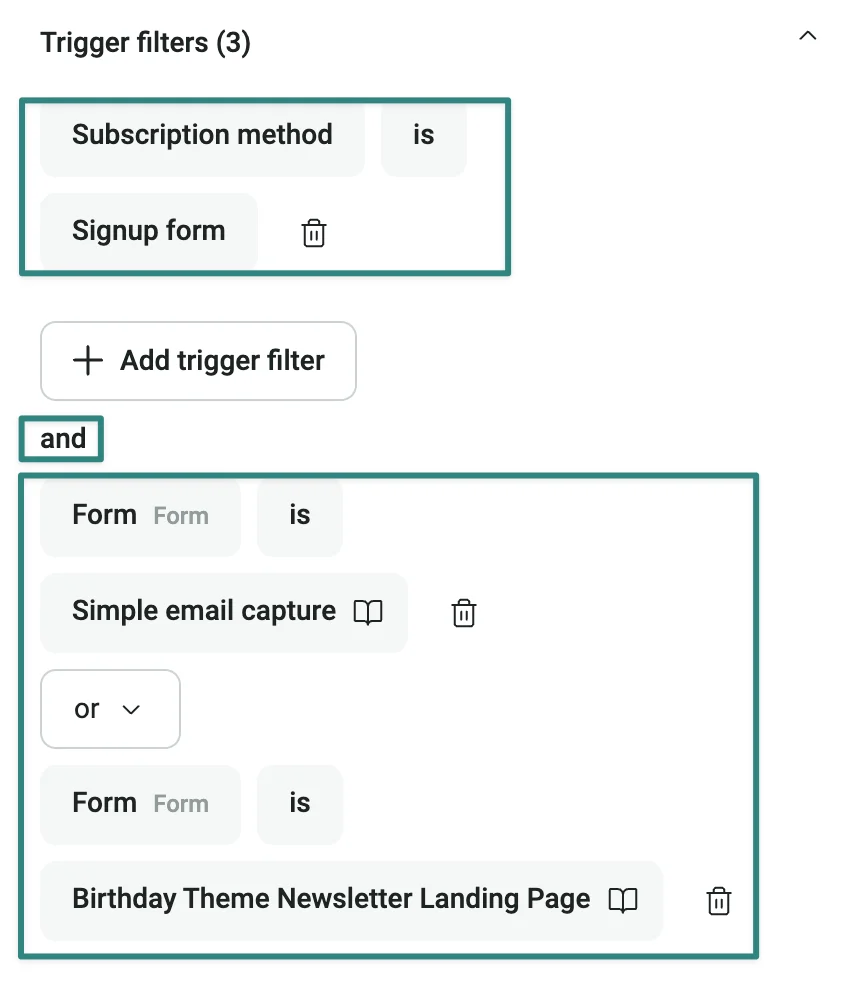
Use a matching requirement in both tools. For example: send to subscribers who joined through either of two selected forms. Check whether your current Shopify setup can deliver that audience and timing before deciding whether Omnisend is worth migrating to. This screenshot alone does not establish better results.
Treat consent and duplicate sends as migration requirements
A synchronized contact isn't automatically an email subscriber. Omnisend's Shopify connection distinguishes subscribed and non-subscribed contacts. Compare the same subscription status before treating different audience totals as a sync failure. Official contact-sync guide
Use controlled test registrations to check subscription, unsubscribe, and post-purchase exclusions. Inspect existing welcome and cart-related automations before enabling replacements. Two tools reacting to the same event can produce duplicate messages or conflicting offers.
Create a small cutover plan: what stops, what starts, who checks it, and how you return to the previous setup if the new flow isn't ready. This article doesn't connect accounts or change any live campaign.
Check the sending domain, sender identity, authentication, and unsubscribe behavior as part of the comparison. Changing software doesn't establish that inbox placement will improve. Our domain-authentication guide covers that preparation separately.
Check today's product, then check your account
Feature announcements should update your comparison, not replace an eligibility check. We reviewed Shopify's June 2026 Smart delivery update and July WhatsApp announcement, plus Omnisend's August product update. All were checked on September 14. Shopify Smart delivery · Shopify WhatsApp · Omnisend August update
An email comparison doesn't establish SMS or WhatsApp availability, pricing, or consent requirements for your market. Review those channels separately if they are part of the project. Likewise, test the actual interface and support options your team needs instead of assuming language coverage from an AI feature description.
Sort requirements into essential now, useful soon, and not currently needed. A store sending four newsletters each month shouldn't let speculative future needs obscure the work it must do today.
Frequently asked questions and the next decision
Has Shopify Email disappeared?
Its current name is Shopify Messaging, and email remains part of the product. Use current documentation when checking old comparisons.
Why pay for Omnisend if Shopify includes email sends?
It may be worth evaluating if its forms, audience organization, and follow-up workflow make an important process easier for your team. That benefit needs to justify both the subscription and migration effort; it isn't automatic.
Can I compare both without moving everything?
Yes, but plan the test so both tools don't send the same automated message. Use a controlled audience and switch one workflow at a time.
The next step is one practical experiment in Omnisend's free plan. Stay within its contact and send limits, test the workflow that's currently difficult, and obtain the paid quote for your real audience size. If your existing Shopify setup already works, keeping it is a valid outcome.


