

Start with fulfillment ownership, not a promised launch date
Reviewers.com is for US-based Shopify brands. A business based elsewhere shouldn't assume that shipping to US addresses makes it eligible. Confirm your business setup first. Official brand eligibility
For a first campaign, the useful goal is a working path from an available product to a reviewed video asset. Decide who will ship the samples and who will approve the received footage for your own pages. Those are separate tasks, even if one person handles both.
This guide focuses on setup decisions and operational handoffs. Our Reviewers.com review covers product fit; the pricing guide covers the budget. We haven't run a campaign ourselves. Official information was checked on September 12, 2026.
Prepare the store, product, and trial budget
Choose a product you can ship before starting the setup flow. The Shopify App Store listing provides the installation entry point and lists English as the app language. Select the correct store and read the permissions and billing terms shown during installation.
The campaign requires Shopify Checkout and enough inventory. It covers one product, can include variants, and offers either five or ten items. Keep normal sales inventory available too. Campaign prerequisites
Our suggested preparation sheet has four entries: the product page, stock reserved for gifting, the fulfillment owner, and the first intended destination for the footage. This is an editorial planning aid, not a list of mandatory app fields.
The standard subscription is US$150 per month with one campaign. New merchants receive a 30-day trial with one free campaign; products and shipping still cost your business money. Our referral offer advertises 10% off the subscription, subject to the terms shown at signup. Check whether the final campaign step uses an included credit or requests a payment before submitting. Official billing explanation
Define a useful audience and choose priority access
Screen for people who can use the product, rather than people likely to praise it. Start a new campaign, name it for your internal records, and select the product, variants, quantity, and audience. You can add up to three qualifying yes/no questions. Review the settings before submission: campaigns aren't editable after creation. Official setup instructions
For a fictional collapsible laundry hamper, a useful planning question is whether the participant's normal laundry routine provides a relevant setting. An exact room color or a requirement to call the product “perfect” wouldn't help establish product fit. Keep necessary conditions separate from creative preferences.
Priority Reviewers adds another choice: selected reviewers get access for the first 24 hours, followed by the wider eligible community. Treat this as early access, not a guarantee that everyone you choose will participate. Priority Reviewers announcement
Write the brief and choose when people can submit
Give a filming direction while leaving the opinion to the reviewer. The official July update introduces AI-generated briefs. Read any generated text before using it; product features and requested demonstrations still need to match what you actually sell. July product update
For the hamper example, a preparation note could ask for footage of unfolding it, filling it during a normal routine, and folding it for storage. Avoid adding a performance promise just because it sounds persuasive. This example is our suggested approach, not a tested campaign.
Review requests can be timed 1–30 days after purchase, fulfillment, or delivery; the default is 14 days after fulfillment. Delivery-based timing needs delivery data in Shopify, otherwise the workflow falls back to fulfillment. Request timing documentation
If a minimum use period matters, review the option allowing submission before the request. Turning it off prevents early submission and adds a question about availability for the required period. Minimum use period and quality guidance
Don't convert that email setting into a promised delivery date for finished assets. Our recommendation is to choose the interval around meaningful product use and commit to advertising dates after reviewing what arrives.
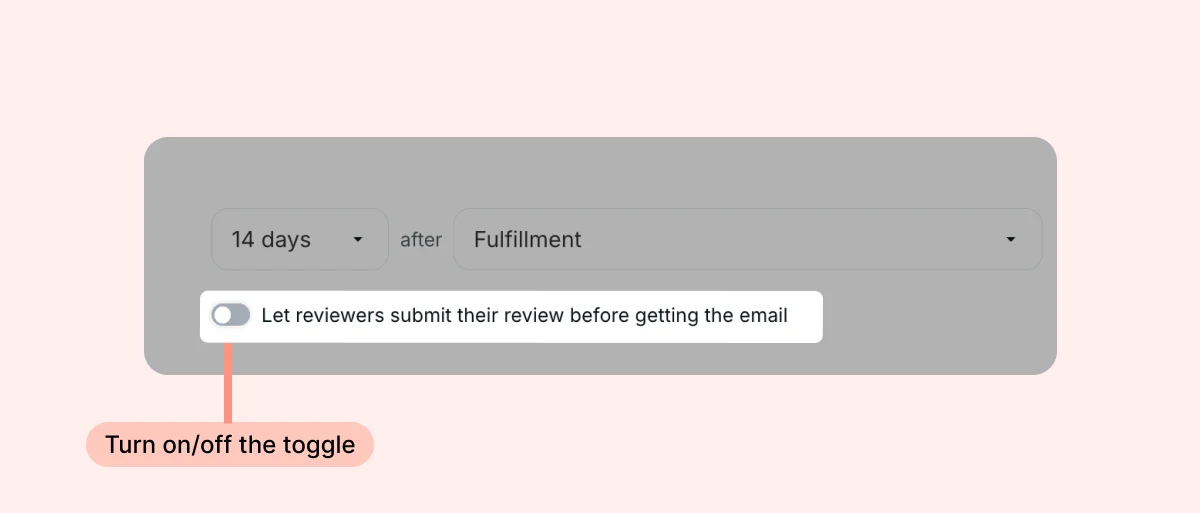
Read the timing basis after “after” together with the toggle below it. This helps you check whether early submission conflicts with the time needed to try your product. The pictured interval is an example, not a recommended setting or a video delivery deadline.
Submit, then track recruitment and shipping separately
Submission starts an approval process. Check the final settings and submit for approval; eligible reviewers subsequently claim products and order through your store. Approval and participation flow
Reviewers' orders use a discount covering the product and shipping. The code prefix is “RVS-”, and your normal Shopify fulfillment process applies. Official ordering explanation
Tell fulfillment which product is involved and how to recognize those orders. A zero-priced campaign order shouldn't be confused with a failed purchase. Keep delivery details in the regular order workflow so the shipping owner can investigate them.
The campaign's “Completed” status means its slots were claimed or its recruitment window ended. It doesn't mean every video has arrived. Check participant review status separately. Campaign status definitions
For your own handoff, use separate entries for recruitment finished, order shipped, and video reviewed. That makes it clear whether the next action belongs to fulfillment or marketing.
Receive the videos and decide how to publish them
Check the asset before treating it as ready for your store. Submitted videos pass an AI quality check. Concerns can be raised with support, but the service doesn't give you a right to demand a reshoot or a different opinion. Video quality rules
For export, open Manage Reviews and choose Export reviews. If you use Loox, reviews sync automatically and follow its auto-publish settings. Check those settings before collection starts if your team wants to review content before it appears. Other apps can require additional work to attach video files. Export and integration instructions
Our suggested handoff checklist is deliberately practical:
- Match the video to the correct product and intended page.
- Check that captions and cuts preserve the reviewer's meaning.
- Keep the product-gifting context clear to viewers.
- Name the person responsible for publishing, then record the actual page URL.
Test one imported review before processing the rest. A successful CSV import doesn't by itself show that the right video is attached to the right product.
Questions to resolve before your first campaign
Proceed when both the budget and the follow-through are ready. You should know what you're gifting, what approval will cost, when requests should go out, and who owns shipping and asset review.
Can I guarantee an asset count and delivery date?
We haven't verified a guaranteed count or receipt date for your individual campaign. Don't book the advertising launch on the assumption that gifted quantity equals usable videos received. Receive and review the assets first.
Do I need to add Loox?
No. Choose a display workflow around your existing tools and where you'll first use the footage. See our Reviewers.com pricing guide for the financial considerations.
Which recent changes did you check?
On September 12, 2026, we checked the official blog index, the July roundup, and the Priority Reviewers announcement, alongside the pricing documentation, setup help, and app listing. Exact publication dates weren't visible on those blog articles, so a complete three-month release history remains unverified. Current account eligibility and the arrangement of your installation screens must be checked in your own store.